Protect your Microsoft Excel(R) workbooks from reverse engineering, analyzing and copying!


LockXLS is a new security solution for Excel. LockXLS protects your workbooks from reverse engineering, analyzing and unauthorized copying. It will help you to create trial ware or rental ware from your documents, and to protect logic in your spreadsheets.

Main features of LockXLS
  • LockXLS protects your spreadsheet with a: So, you can prevent unauthorized use of your Excel documents.
  • Spreadsheet could be converted to protected Excel document or to binary application file.
    Application is stand-alone and could be distributed without LockXLS Runtime module and other files.
  • Create rental files using LockXLS. Hardware based Activation Code will unlock spreadsheet only to specified period of time.
  • Formulas and VBA code are unavailable to user. He will not be able to view and analyse logic of your workbook.
  • Protect workbooks from cracking VBA passwords and sheet passwords.
  • On-line activation. Keygen applications for Linux and Windows, also you can provide URL for on-line activation.
  • Protected spreadsheet and LockXLS Runtime module could be combined into single compact executable file. This setup package will install your spreadsheets and LockXLS Runtime on customer's PC.
  • Protecting your AddIns (.xla) files in same way, like other Excel documents.
  • Interface to display your End-User License Agreement with Accept and Decline buttons.
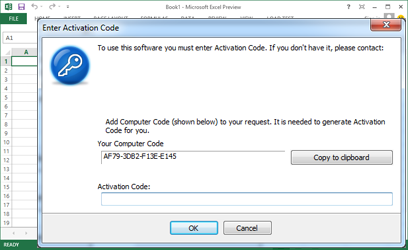
  • Customize activation messages shown when user opens locked workbook.
  • Custom icon to applications, created from Microsoft Excel documents.
  • Your customers will work with protected files in same way as with usual Excel documents.
Typical questions from our customers
Q: My spreadsheet should have evaluation timeout after which customer must purchase license. License should be renewed after each 90 days. Could your product protect file in such way?
A: Yes. LockXLS offers this and other protection options.
Q: If customer will copy protected file to other PC, will it ask for new Activation Code?
A: Yes. If your file is protected with Hardware Based Activation Code. To use your file on new PC customer should enter new Activation Code.
Q: I have AddIn written in VBA, can I use LockXLS to protect it?
A: Yes. LockXLS protects .xla files like other spreadsheets.
Q: I'm using international version of Excel, will LockXLS Runtime support it?
A: Yes. LockXLS supports international versions.
Q: Will LockXLS work with Excel 2007?
A: LockXLS works with Excel 2000/XP/2003/2007.
Q: I need a feature which is not present in your software.
A: Report us about this feature and it will be included into next version of LockXLS.
Q: I'm using 2 laptops one in the office and one at home. Should I purchase 2 copies of LockXLS in this case?
A: No. In this case we'll provide you 2 Activation Codes for 1 purchased copy.
Q: I've lost my original files and have only protected copy. Can you help me to restore it?
A: Yes. Our Help Library has a topic, where this process is described.
Can't find your question here? Ask us using this form.
Other minor features of LockXLS
  • Time syncronization with Internet Time Servers. Customer will be unable to rollback time and "extend" his evaluation.
  • Activation Code Generator is included into setup package for LockXLS.
  • Logic of your workbook could not be copied to other spreadsheet.
  • Formulas and VBA macros are unaccessible through COM Object Model. User could not write a VBA code to retrieve your formula or macro!
  • You can add your own protection message (in rtf format with images) to locked workbook. See example ...
  • There are no limitations to workbook, which should be protected. All features of Microsoft Excel are supported by LockXLS.
  • Protected spreadsheet model will be as fast as original model.
  • LockXLS will check that all needed AddIns are installed on customer's PC when workbook is opened.
  • Data in spreadsheet will be encrypted with secure 128-bit algorithm.
  • Save/load data to external file.
  • LockXLS supports shared files.
  • Data on hidden sheets could not be accessed from external application.
  • Splash screen with custom image.
  • LockXLS has very simple interface and will be easy to use. See screenshot ...
  • Product is easy to install and uninstall.

If this list of features doesn't meet your requirements, please send us your suggestions using this form and we will implement it in nearest release!

IMPORTANT:  Documents protected with LockXLS require LockXLS Runtime Module to be installed on user's PC. This setup if FREE and could be downloaded from this link. You can distribute it with encrypted workbooks without any limitations. Or your customers can download it from our site.


LockXLS
FREE download
LockXLS.msi
 
Runtime module
FREE download
LockXLSrtm.msi


Dependency Auditor
Analyse and trace
dependencies and
errors in spreadsheet with
Dependency Auditor
 
Testimonial
I was looking for an application to secure my custom Excel solution for distribution to potential clients and LockXLS was just that solution ...
Brian Somerville
 
I think LockXLS is an invaluable tool for anyone who wants to protect their Excel spreadsheets ...
Marcos S. Bolorino